As a part of the course from OpenCV, this is the explanation of the Doppelgänger project, which detects how similar is a sample photo to a database of celebrities photos.
The main idea of the following code is to use an already trained neural network to enroll and add more training data to recognize the faces of celebrities look alike. Each image is transformed into a feature vector in $\mathbb{R}^{128}$; in the ideal case each vector belonging to the same suject should cluster near other vectors of the same subject and far away form vectors of other subjects.
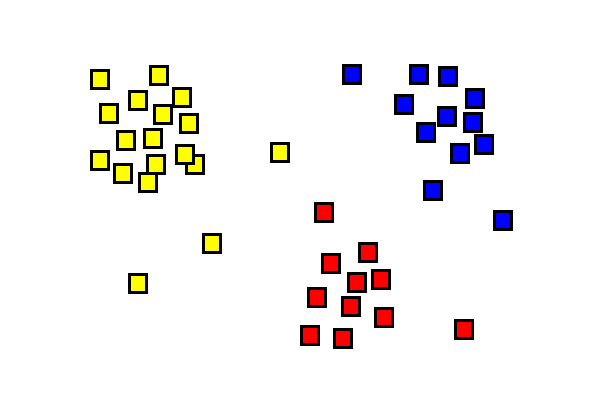
The steps performed by the program are:
- Load the dataset and the associated label
- Enroll the dataset in a previously trained neural network
- Check with some tests image the validity of the enrollment
Load the dataset and the associated label
Since the whole detection is done on faces, load the Dlib shape detector and face recognition model based on ResNet
1faceDetector = dlib.get_frontal_face_detector()
2
3shapePredictor = dlib.shape_predictor('models/shape_predictor_68_face_landmarks.dat')
4
5faceRecognizer = dlib.face_recognition_model_v1('models/dlib_face_recognition_resnet_model_v1.dat')
6
Then load the faceDatasetFolder and labelMap. The first is the dataset database, organized in a folder structure, where each folder contains a set of image for a celebrity.
celeb_mini
└───n00000001
|   |     n00000001_00000263.JPEG
|   |     ...
|   |     n00000001_00000900.JPEG
└───n00000003
|   |     n00000003_00000386.JPEG
|   |     ...
|   |     n00000001_00000900.JPEG
...
...
...
└───n00002619
|   |     n00002619_00000265.JPEG
|   |     ...
|   |     n00002619_00000506.JPEG
labelMap is a dictionary that maps each directory with a name of celebrity
{'n00000001': 'A.J. Buckley', 'n00000002': 'A.R. Rahman',
...
'Alison Pill', 'n00000092': 'Alison Steadman', 'n00000093': 'Alison Sweeney',
'n00000094': 'Allie Gonino', 'n00000095': 'Allison Williams',
'n00000096': 'Amanda Detmer', 'n00000097': 'Amanda Seyfried', 'n00000098':
'Amandla Stenberg', 'n00000099': 'Amaury Nolasco', 'n00000100': 'Amber Riley'
...
}
Enroll the dataset
With the previous data we are ready to enroll all the images in the dataset using the dLib ResNet model.
The images are processed one by one and stored in a faceDescriptor, which is a vector representing the image in a n-dimensional space : here n is 128, so vectir $v \in \mathbb{R}^{128}$
 1index = {}
 2    i = 0
 3    faceDescriptors = None
 4    namePathMap = {}
 5    for localPath in imagePaths:
 6        for imagePath in os.listdir(os.path.join(faceDatasetFolder, localPath)):
 7            print("processing: {}".format(imagePath))
 8            # read image and convert it to RGB
 9            imageFullPath = os.path.join(faceDatasetFolder,localPath,imagePath)
10            img = cv2.imread(imageFullPath)
11
12            # detect faces in image
13            faces = faceDetector(cv2.cvtColor(img, cv2.COLOR_BGR2RGB))
imagePaths is the list of all subfolders in the dataset (n00000001, …, n00002619).
In each subfolder an image is read and processed to detect the faces, even if usually there is only one face in each image.
All the faces are used with shapePredictor and the faceRecognizer.compute_face_descriptor to retrieve the vector representing the face in $\mathbb{R}^{128}$
1...
2            print("{} Face(s) found".format(len(faces)))
3            # Now process each face we found
4            for k, face in enumerate(faces):
5
6                shape = shapePredictor(cv2.cvtColor(img, cv2.COLOR_BGR2RGB), face)
7                faceDescriptor = faceRecognizer.compute_face_descriptor(img, shape)
8...
The rest of the code puts this descriptor in a list, convert it to a numpy array and create a matrix where each row is a descriptor
1faceDescriptorList = [x for x in faceDescriptor]
2faceDescriptorNdarray = np.asarray(faceDescriptorList, dtype=np.float64)
3faceDescriptorNdarray = faceDescriptorNdarray[np.newaxis, :]
4# Stack face descriptors (1x128) for each face in images, as rows
5if faceDescriptors is None:
6    faceDescriptors = faceDescriptorNdarray
7else:
8    faceDescriptors = np.concatenate((faceDescriptors, faceDescriptorNdarray), axis=0)
The label is saved in an index and a further dictionary namePathMap is used to map each index of the image with the proper filename transformed into a descriptor. These data will be used later to map the descriptor of the test images to the proper celebrity name and her most similar image.
Test with non trained images
It’s time to test to check if the enrollment correctly detect an untrained image as the subject it belongs to.
Give a set of testImages as filenames
1testImages = glob.glob('test-images/*.jpg')
each face in the image (retrieved from the face detector shapePredictor of dLib) is passed through the neural network and converted in an numpy ndarray faceDescriptorNdarray
 1for test in testImages:
 2    im = cv2.imread(test)
 3    imDlib = cv2.cvtColor(im, cv2.COLOR_BGR2RGB)
 4
 5    faces = faceDetector(imDlib)
 6    # THRESHOLD value to check if the image belongs to a celebrity
 7    THRESHOLD = 0.6
 8    # Process each face
 9    for face in faces:
10
11        # Find facial landmarks for each detected face
12        shape = shapePredictor(imDlib, face)
13
14        # find coordinates of face rectangle
15        x1 = face.left()
16        y1 = face.top()
17        x2 = face.right()
18        y2 = face.bottom()
19
20        # Compute face descriptor using neural network defined in Dlib
21        # using facial landmark shape
22        faceDescriptor = faceRecognizer.compute_face_descriptor(im, shape)
23
24        # Convert face descriptor from Dlib's format to list, then a NumPy array
25        faceDescriptorList = [m for m in faceDescriptor]
26        faceDescriptorNdarray = np.asarray(faceDescriptorList, dtype=np.float64)
27        faceDescriptorNdarray = faceDescriptorNdarray[np.newaxis, :]
To check if the image “clusters” near a similar one, the distance is computed and compared to a threshold. If it’s less then it is indentified as the same subject and shown with the similar face in the dataset.
 1        if minDistance <= THRESHOLD:
 2            label = index[argmin]
 3        else:
 4            label = 'unknown'
 5    celeb_name = label
 6    ####################
 7
 8    # display the test image
 9    plt.subplot(121)
10    plt.imshow(imDlib)
11    plt.title("test img")
12
13    # along with the celebrity identified
14    celebImage = cv2.imread(namePathMap[argmin])
15    celebImage = cv2.cvtColor(celebImage, cv2.COLOR_BGR2RGB)
16    plt.subplot(122)
17    plt.imshow(celebImage)
18    plt.title("Celeb Look-Alike={}".format(celeb_name))
19    plt.show()